
Customizing Products Displayed in a Category Using Product Code
The Product Code Override feature gives you simple and flexible control over which product type is displayed in a Category. With just a small parameter in the URL, you can turn a Category into a Hoodie-only page, a 3D Shirt-only page, or any product type you want - without editing individual campaigns.
This makes it easy to create themed collections, optimize the customer experience, and better serve your ad campaigns or landing page needs.
What is a Product Code?
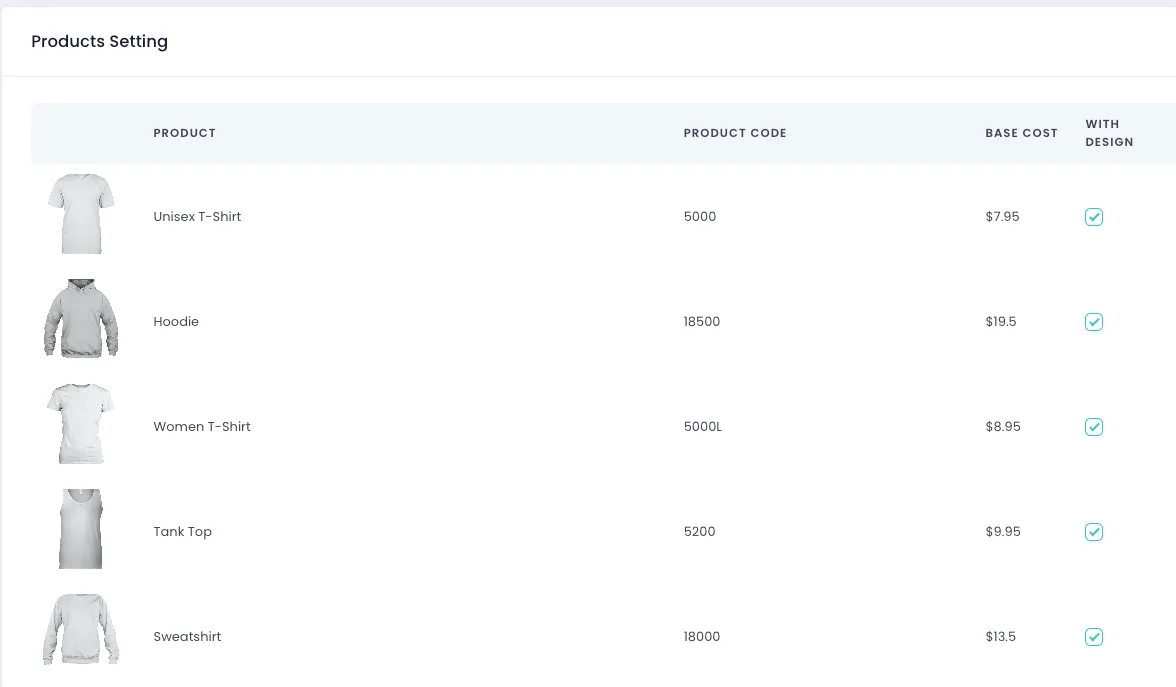
Every product in the system has a unique identifier called a product_code. This code lets you specify exactly which product type to display on a Category page.
You can view the full list of product codes at: [yourdomain]/admin/product/setting or go to Admin → Settings → Product Settings. Here you can:
- View the full product list and their corresponding product codes
- Quickly find the code of the product you want to override
How to use product_code on a Category Page
Step 1 - Open the Category you want to apply
Section titled “Step 1 - Open the Category you want to apply”Example:
https://yourstore.com/category/summer-collection
Step 2 - Add product_code to the end of the URL
Section titled “Step 2 - Add product_code to the end of the URL”Syntax:
?product_code=<product_code>Example: to display all campaigns in the category as Unisex T-shirts:
https://yourstore.com/category/summer-collection?product_code=5000
Result after applying product_code
Section titled “Result after applying product_code”- All campaigns in the Category will display the mockup for the product type you selected (Unisex T-shirt)
- Prices automatically adjust to the selected product’s pricing
- When a customer clicks a campaign, it opens with the correct product (Unisex T-shirt)
No need to edit campaigns or re-upload mockups.
Product Code Override gives you a fast and efficient way to sync product display across a Category. Just apply the correct product_code, and all mockups and prices will update to match your chosen product. If a campaign doesn’t support that product, or if you need additional help, the technical team is always ready to check and assist you.