
Reconciling Purchase Data Between Ads and Your Store
When tracking sales across Facebook Ads, GA, and the store Dashboard, there may be cases where tracking platforms record more purchases or thank-you page visits than the actual order count on the system.
To help sellers investigate these discrepancies, we’ve added the Order Received Visitors feature on the /admin/conversion-analytics page.
This feature records visits to the Order Received / Thank You page, helping you distinguish between valid same-day order visits and returning customers revisiting an old page.
1. How Order Received Visitors Works
Section titled “1. How Order Received Visitors Works”On the /admin/conversion-analytics page, the system records visits to the Order Received / Thank You page and displays the following information:
- Path
- Order Number
- Referer (Domain)
- Query String
- Country
- Visit Date
Additionally, visits are classified into:
- Valid Order Count
- Invalid Order Count
Visits with Referer = Direct/Unknown are generally considered invalid, as these typically occur when customers revisit the page by:
- reopening an old browser tab
- using a saved bookmark
- refreshing the page
- returning to check order details at a later time
In contrast, visits with a referer from another source tend to more accurately reflect orders placed that day.
As a result, tracking tool or thank-you page numbers may be higher than the Dashboard, but this does not mean the store is losing orders.
2. How to Check the Conversion Analytics Page
Section titled “2. How to Check the Conversion Analytics Page”Step 1 - Open the Conversion Analytics Page
Section titled “Step 1 - Open the Conversion Analytics Page”You can access the Conversion Analytics page in one of two ways:
- Go directly to /admin/conversion-analytics
- Or from the Dashboard, in the Store conversion rate section, click the View conversion analytics icon
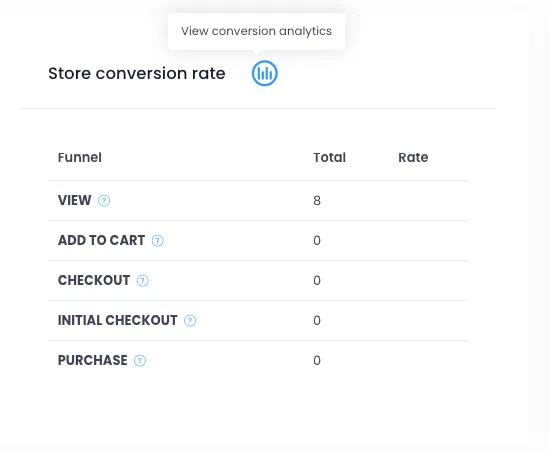
Once on the page, you’ll see the Order Received Visitors section for tracking visits to the Order Received / Thank You page.
Step 2 - Check Valid Order Count and Invalid Order Count
Section titled “Step 2 - Check Valid Order Count and Invalid Order Count”At the top of the table, the system displays:
- Valid Order Count: the number of valid visits to cross-check against actual orders
- Invalid Order Count: the number of invalid visits, typically revisits from customers who have already viewed the page
These are key indicators to explain why the thank-you page or tracking purchase count may be higher than the actual order count on the Dashboard.
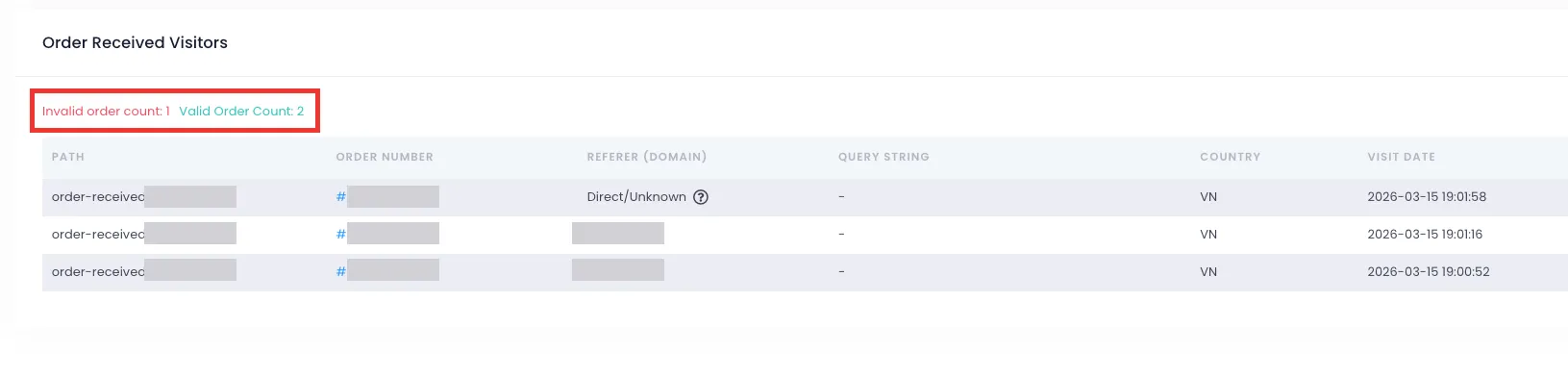
Step 3 - View Detailed Data Per Row
Section titled “Step 3 - View Detailed Data Per Row”In the Order Received Visitors table, the system displays information such as:
- Path
- Order Number
- Referer (Domain)
- Query String
- Country
- Visit Date
In addition to the data shown directly in the table, you can hover over the icon on each row to see a detailed explanation for that visit.
For example, for rows with Referer = Direct/Unknown, hovering over the icon will show a note such as: the customer returned via reload, bookmark, or reopened tab, so this visit does not count as a new order.
This helps you understand why the Thank You page or tracking tools may record additional visits while the Dashboard shows no new orders.
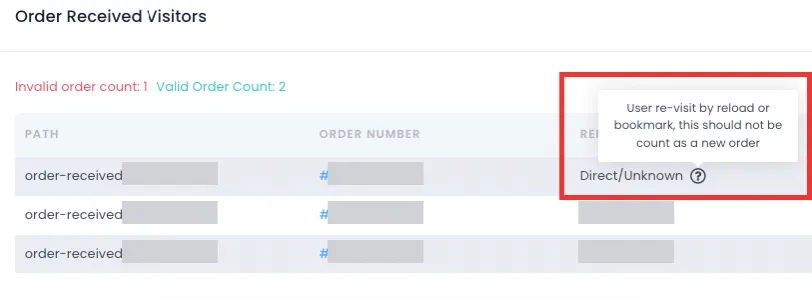
Step 4 - Cross-Check Against Dashboard and Tracking Data
Section titled “Step 4 - Cross-Check Against Dashboard and Tracking Data”After reviewing the Order Received Visitors list, you can cross-check with the Dashboard, Facebook Ads, or Google Analytics to understand the cause of any discrepancies.
When cross-checking, keep in mind:
- Valid Order Count usually reflects valid visits related to that day’s orders more closely
- Invalid Order Count typically includes customers returning to the Order Received / Thank You page via reload, bookmark, or reopened tab - so these are not counted as new orders
- Therefore, tracking tool numbers may be higher than the Dashboard, but this does not mean the store is losing orders
If you notice Ad sales or thank-you page visits exceeding your store’s order count, you can check this section to determine whether those are valid visits or simply re-visits of the same order.
3. Example
Section titled “3. Example”Let’s say today the Order Received Visitors page shows an extra visit to the thank-you page.
However, the order linked to this visit was actually created earlier on the system. The customer simply returned to view the order page via an old tab or bookmark - so the tracking system still records an additional visit, but the Dashboard does not show a new order.
In this case, the discrepancy is due to how tracking captures data, not because the store lost an order.
4. Summary
Section titled “4. Summary”The Order Received Visitors feature helps you reconcile and better understand the differences between:
- tracking data in Ads/GA
- visits to the Thank You page
- actual paid orders on the store
In most cases, discrepancies arise from how tracking platforms record data.
Please monitor the /admin/conversion-analytics page whenever you notice mismatched numbers across platforms. If you need a more detailed cross-check, you can share the time range and the Ads/GA vs. Dashboard figures with the support team for faster assistance.
We hope this guide helps you track and reconcile sales data more easily as you run your store. If you need further assistance, please contact the support team for a detailed review.